Cast by whimsi.eth
Show the cast this replies toyeah good question (this is mostly from codex since i’m not too well versed) the tool sends up to 5 GET /v1/info requests per node directly from your browser. it averages the successful ones, timing from just before fetch() until the JSON has been read and checked. a fresh connection can also include DNS, TCP and TLS setup. raw ping is just the ICMP round trip codex tested imgnAI with curl and got ~246ms for GET / vs ~731ms for GET /v1/info over the same connection. most of the gap was waiting for the first byte codex asks what URL and method were you using for the sub-180ms HTTPS test?
2 replies
also here’s the curl command: `host=hypersnap.imgnai.com curl -sS --max-time 8 \ -w 'url=%{url_effective} status=%{http_code} new=%{num_connects} ttfb=%{time_starttransfer} total=%{time_total}\n' \ -o /dev/null "$host/v1/info" \ -o /dev/null "$host/" \ -o /dev/null "$host/v1/info" \ -o /dev/null "$host/" \ -o /dev/null "$host/v1/info"`
😹 3 backticks, newline, code, close with 3 backticks ``` echo "Henlo, Wurldz 😺" ```
thanks. So `/v1/info`, like any API endpoint, is not a good way to measure **latency**, this moreso feels like **info call response time**, if this makes sense. Bear in mind that a lot of calls send more data, others send less. So the best way to test this is simply with ICMP ping, which is the literal definition of latency, in many senses. Where you cannot (such as the node has blocked pings at the firewall), you can do a curl of the root domain i.e., `hypersnap.imgnai.com` and only time up to TCP connect (`time_connect` in curl). This works for HTTPS as well as HTTP port 3381 nodes (this is actually the default for nodes--not https) Remember with latency you are timing network conditions, not data gathering conditions!
appreciate the teaching moments, proof that vibe coding isn't quite as easy as point-and-shoot (or maybe it is, if i was using a more powerful reasoning model, but currently using 6.2 sol on medium) from what i can see, it's looking like there's no web-based version of checking unless Timing-Allow-Origin is exposed how are these numbers looking? closer to what you were expecting? (aus-based) codex mentions one thing to be aware of is that homiehouse's TCP listener answered quickly but the /v1/info requests failed in earlier browser tests - which i guess snapdiff must be using also to check whether a validator's status is up or down
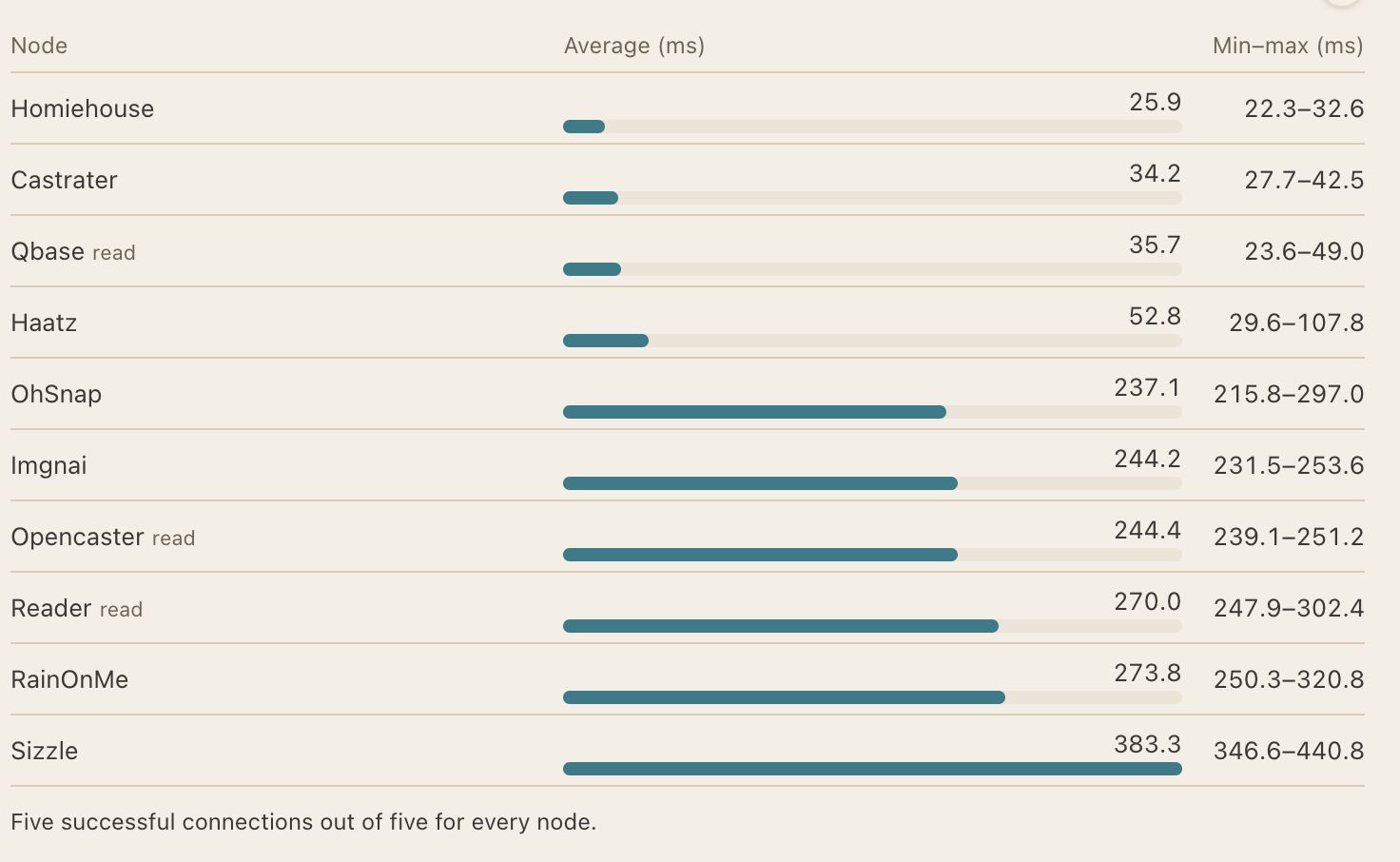
If you're testing from AUS, that could look reasonable, yeah! ``` arfonzo@rpi5 ~> curl -sS -o /dev/null -w 'HTTP: %{http_code} | DNS: %{time_namelookup}s | TCP: %{time_connect}s | TLS: %{time_appconnect}s | TTFB: %{time_starttransfer}s | Total: %{time_total}s\n' hypersnap.imgnai.com/v1/info HTTP: 200 | DNS: 0.002495s | TCP: 0.084490s | TLS: 0.180091s | TTFB: 0.646054s | Total: 0.646116s ``` (TTFB: time to first byte, just extra data in case you're interested, not really needed here for our discussion.) So you can probably do a combination of rules here. If you get a 200 OK response from the `/v1/info` endpoint, that is a good indication that it's up. Then you break it down into two data points from this: - online status: up from the HTTP 200 OK response. - latency: take TCP connect time: 84ms If it's down (no response from endpoint), forget the latency and just report it as offline. That's just one way to do it!